
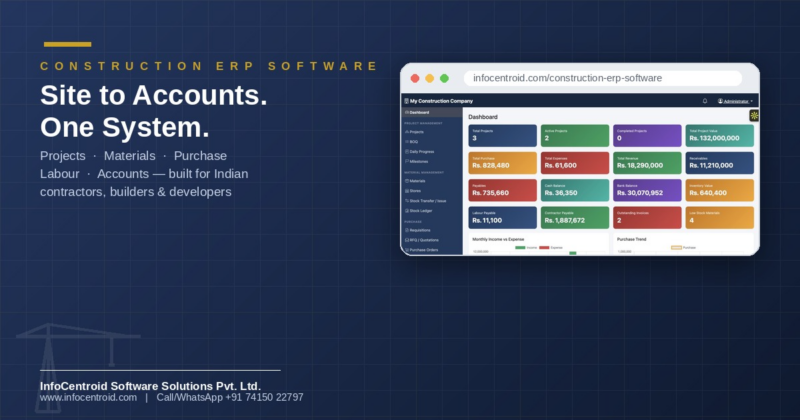
Construction ERP Software for Contractors, Builders & Real Estate Developers
Construction ERP software is a single online system that connects a construction company’s projects, material stock, purchase orders, labour, subcontractor billing and accounts — replacing scattered spreadsheets, WhatsApp updates and disconnected billing tools. It gives owners real-time visibility into project cost, profitability and cash flow, and gives site and accounts teams one shared source of truth, accessible from the office, the site, or a phone.
Talk to our team for a free walkthrough and a plan customised to your company — reach us anytime: +917415022797 / +917566663042 (call or whatsapp)
Why Spreadsheets and WhatsApp Groups Stop Working
As a construction company grows past one or two sites, the same problems repeat: nobody can say a project’s real profit or loss without waiting for the accountant; material goes missing between the store and the site with no record; purchase orders are approved on phone calls with no paper trail; and subcontractor (RA) bills are reconciled manually every month. A construction ERP fixes this by putting every project, purchase, bill and payment into one connected system that updates in real time.
What Is Included: A Complete Site-to-Accounts Platform
Every module below shares the same project and accounting core, so a purchase order, a site material issue and a client invoice all roll up automatically into one project’s Profit & Loss — nothing has to be re-entered or reconciled by hand.
How do you manage multiple projects and sites?
The Project Management module tracks every project’s budget, schedule, milestones, BOQ (Bill of Quantities) and day-to-day site progress, with a live financial dashboard per project showing contract value, actual cost, client billing and profit or loss.
How do you control material stock and site wastage?
Material Management gives you a central material catalogue, multiple site stores, stock transfer/issue tracking and a full stock ledger — so every bag of cement or bar of steel is accounted for from purchase to consumption, with automatic low-stock alerts.
How do you manage purchase orders, GRN and vendor bills?
The Purchase module covers the full cycle: requisitions, RFQ/vendor quotation comparison, formal purchase orders, GRN (Goods Receipt Note) against actual delivery, and purchase bills — all linked back to the project that consumed the material.
How do you manage clients, vendors and subcontractors?
A single Parties directory holds every client, vendor and contractor, reused across projects, purchase orders and billing. Contractor Work adds subcontractor work orders and RA (running account) bills with payment certification, so subcontractor payments are tracked against actual work done.
How do you manage labour attendance and wages?
Workforce covers the labour master, daily attendance capture per site, and wage computation and payment records — giving you labour cost per project without a separate muster-roll register.
How do you send GST-ready invoices to clients?
Sales covers client-facing quotations, project-linked invoices with balance-due tracking, and receipts — so client billing and collections are visible against the same project ledger as your costs.
Do I still need separate accounting software?
No. Finance & Accounts is a full double-entry accounting layer underneath every module — expenses, payments, banking, chart of accounts, vouchers, ledgers, and auto-generated financial statements (Trial Balance, Profit & Loss, Balance Sheet). There is no need to re-key transactions into Tally or another accounting package.
Can I track machinery and equipment cost?
Equipment lets you maintain a machinery master and allocate usage and running cost to the project that used it, so equipment cost is part of the same project P&L.
How do I get reports for management decisions?
Reports & Documents brings cross-module MIS reports, centralised document storage for contracts and drawings, and a configurable approval workflow for requisitions, purchase orders and bills.
Can I control who sees what?
Administration gives you role-based access for staff, site engineers and accountants, company-wide settings, and full audit logs — so as more people use the system, management keeps control of what each role can see or change.
Who Uses Construction ERP Software Like This?
- Civil contractors and builders running multiple residential or commercial sites at once.
- Real estate developers who need project-wise cost and client billing visibility.
- Turnkey and interior contracting companies managing subcontractors and RA bills.
- PWD, government and EPC/infrastructure contractors needing BOQ, milestone and documentation control.
Why Construction Companies Choose This System
- Built for Indian construction businesses — GST-ready billing, RA bills, and workflows that match how Indian sites and accounts teams actually work.
- One system instead of five — projects, materials, purchase, labour, subcontractors and accounts share one database, so nothing needs manual reconciliation.
- Works from the site or the office — a browser-based system usable from a laptop, tablet or phone, with no software to install.
- Role-based access and full audit logs, so growing your team doesn’t mean losing control.
- Customised to your workflow and hosted, secured and supported by InfoCentroid — not a rigid off-the-shelf template.
Get Construction ERP Software Built Around Your Business
Every construction business runs a little differently. We customise workflows, approval levels, invoice formats and reports to match how your company actually works, then host, secure and support the system for you.
Talk to our team for a free walkthrough and a plan customised to your company — reach us anytime: +917415022797 / +917566663042 (call or whatsapp)
FAQ
Q. What is construction ERP software?
A. Construction ERP software is a single system that manages a construction company’s projects, materials, purchases, labour, subcontractor billing and accounts together, instead of using separate spreadsheets, apps and registers for each.
Q. How is this different from using Tally or Excel for construction accounting?
A. Tally and Excel record transactions after the fact and don’t know which project, site or purchase order a cost belongs to. This system links every purchase, material issue, labour cost and client bill directly to a project, so project-wise profit and loss is available instantly — with full double-entry accounting built in underneath.
Q. Can I manage multiple construction projects at the same time?
A. Yes. Every project has its own budget, schedule, stores, purchase orders and financial dashboard, while management gets one company-wide dashboard summarising all active and completed projects together.
Q. Does it handle GST billing and Indian compliance requirements?
A. Yes, client invoices, purchase bills and the accounting layer are built for Indian GST billing and standard statutory reporting needs used by construction and contracting businesses.
Q. Can site engineers and the accounts team use it at the same time?
A. Yes. It is a multi-user, role-based system — site engineers can log daily progress, material issues and attendance while accountants handle billing, payments and financial statements, all from the same live data.
Q. Is our construction and financial data secure?
A. Access is role-based, every action is recorded in an audit log, and the system is hosted and secured by InfoCentroid on your behalf, so only authorised staff can see or change data relevant to their role.
Q. Can the system be customised for our company’s own workflow?
A. Yes. Approval levels, invoice formats, numbering, reports and even additional modules can be customised to match how your company already works, rather than forcing you into a fixed template.
Q. Do we need to install any software?
A. No. It runs in a web browser, so your team can use it from a laptop, tablet or phone at the office or on site, with nothing to install or maintain locally.
Q. Can I track subcontractor RA bills and payments?
A. Yes. The Contractor Work module manages subcontractor work orders and RA (running account) bills, certifying payments against actual measured work so subcontractor accounts stay accurate and auditable.
Q. How do I see a demo or get started?
A. Contact InfoCentroid Software Solutions directly — we’ll walk you through a live working demo populated with sample project data and discuss a setup customised to your business.