
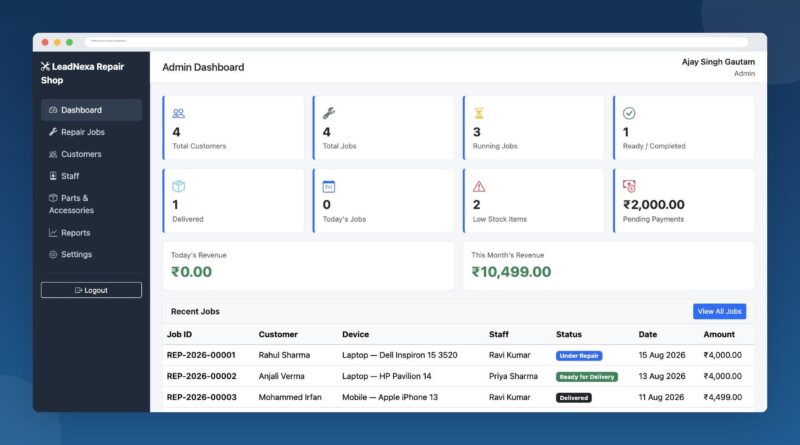
Repair Shop Software Built to Run Your Entire Repair Business
Running a repair shop on notebooks, WhatsApp chats, and memory is fine — until it isn’t. This Repair Shop Management Software gives you one place to log every device that walks through your door, track it through every repair stage, bill the customer correctly, and know exactly what’s sitting in your parts drawer. No spreadsheets. No guessing which technician has the customer’s phone. No forgetting to follow up on a pending payment.
What Is Repair Shop Management Software?
Repair shop management software is a system that replaces the paper job cards, loose Excel sheets, and phone-call follow-ups most repair businesses still run on. It gives you one dashboard to register a customer, open a repair job, assign it to a technician, track its status from intake to delivery, record parts and labour charges, collect payment, and generate an invoice — all logged against a searchable job history. This platform does exactly that, built specifically for repair shops rather than adapted from generic retail or CRM software.
Built for Every Kind of Repair Business
This isn’t a one-trick mobile repair app or a laptop-only tool — it’s flexible enough to be the backbone of almost any repair counter.
Mobile Repair Shop Management Software
If you’re fixing cracked screens, swapping batteries, or replacing charging ports all day, you need job tracking that’s faster than the repair itself. Log the IMEI, the complaint, and the condition on intake, and let the system auto-generate the job ID and track it through diagnosis, repair, and delivery.
Laptop & Computer Repair Shop Management Software
Laptop and desktop repairs usually involve more parts, more diagnosis time, and higher ticket values than mobile repairs. The parts inventory, labour-charge line items, and multi-stage status workflow (Received → Diagnosis → Repair → Ready for Delivery) are built for exactly that longer, more complex repair cycle.
Consumer Electronics Repair Shop
TVs, tablets, gaming consoles, smartwatches, cameras — if you service consumer electronics, you already know each device category needs its own complaint notes, parts, and pricing. Flexible device and category fields adapt to whatever you repair, without forcing you into a mobile-only or laptop-only mould.
Electronic Appliance Repair Shop
Running an appliance repair shop with a wider mix of products — irons, mixers, small kitchen electronics, and general gadgets? The same job-card, inventory, and billing engine that handles phones and laptops works just as well for appliance service tickets, keeping every repair and every spare part in one system instead of three.
Multi-Device Repair Shop
Most repair shops today don’t specialize in just one device — they fix phones, laptops, tablets, and gadgets under the same roof. That’s exactly the problem this software was designed to solve: one system, one customer database, one inventory, covering every device type your shop touches.
Electronics Service & Repair Center
Whether you call yourself a repair shop or a full-fledged electronics service and repair center, the operational needs are the same — job intake, technician assignment, parts consumption, billing, and reporting. This gives a growing service center the structure a single-owner shop doesn’t need yet and a multi-branch operation can’t run without.
Everything Your Repair Counter Needs, in One System
- Customer Management — every customer’s contact details and full repair history in one searchable record.
- Repair Job Tracking — auto-generated job IDs and a 9-stage status workflow so nothing gets lost between “received” and “delivered.”
- Parts & Accessories Inventory — categorized stock with purchase/selling price and automatic low-stock alerts.
- Labour & Service Billing — add labour charges alongside parts, with automatic total and balance calculation.
- Payment Tracking — cash, UPI, card, or bank transfer, including partial payments and running balance due.
- Instant Invoicing — generate a clean, print-ready invoice in one click.
- Customer Self-Service Portal — customers track their own repair status online instead of calling to ask “is it ready yet?”
- Role-Based Dashboards — separate views for Admin, Staff, and Customers, each seeing only what they need.
- Reports & Analytics — revenue, job volume, staff performance, and inventory reports with date-range filters.
Why Repair Shops Choose This Software
Most “repair shop software” on the market is either a bloated retail POS system with repair features bolted on, or a barebones ticketing tool that can’t handle billing or inventory. This one was built the other way around — starting from the actual repair workflow (intake → diagnosis → parts → repair → billing → delivery) and adding the business tools around it. It runs on standard, affordable web hosting, works on any device with a browser, and doesn’t require your team to learn a complicated new system.
How It Works
- Log the job — capture the customer, device, and complaint in under a minute; the system assigns the job ID automatically.
- Assign & track — hand the job to a technician and move it through each repair stage as work progresses.
- Add parts & charges — pull parts from inventory and add labour charges directly on the job.
- Bill & deliver — record payment, generate the invoice, and mark the job delivered — the customer could already see the status change from their own portal.
This repair shop management software is designed and developed by Infocentroid Software Solutions Pvt Ltd, a software development company based in Mumbai and Indore with a track record of building reliable, custom business applications since 2009. The shift makes sense — global spending on digital transformation is projected to keep climbing year after year, and small repair businesses are part of that same wave, moving away from paper job cards and scattered WhatsApp updates toward purpose-built software for job tracking, inventory, and billing. If you’d like this platform customized for your shop’s exact workflow, white-labeled for your brand, or extended with features specific to your business, our team can help — call us directly at +91 74150 22797.
Frequently Asked Questions
What is the best software for a repair shop?
The best repair shop software is one built around your actual repair workflow — job intake, status tracking, parts inventory, and billing — rather than a generic point-of-sale tool. This Repair Shop Management Software covers all four in a single system designed specifically for mobile, laptop, computer, and consumer electronics repair businesses.
Can I use this software for a mobile and laptop repair shop at the same time?
Yes. It isn’t restricted to one device category — the same job card, inventory, and billing system handles mobile phones, laptops, computers, tablets, and general consumer electronics in one place.
Does repair shop management software track inventory too?
Yes — it includes a full parts and accessories inventory module with purchase and selling prices, categories, and automatic low-stock alerts, so you’re not managing stock in a separate spreadsheet.
Can customers check their repair status without calling the shop?
Yes. There’s a customer self-service portal where customers log in and see their repair’s live status, itemized charges, and invoice — cutting down “is my phone ready?” calls significantly.
Is there a free demo available?
Yes — a live demo with sample data is available so you can explore the Admin, Staff, and Customer panels before deciding.